
Summary: **todo summary of project
3D Control file. (3mf)
statue_01_kathy_Hitem3d-1773760946426.3mf
3D Control stl:
statue_00_kathy_Hitem3d-1773760946426.stl


Summary: **todo summary of project
3D Control file. (3mf)
statue_01_kathy_Hitem3d-1773760946426.3mf
3D Control stl:
statue_00_kathy_Hitem3d-1773760946426.stl
bambu control file.
First, you take pix of all the sides. Note that since the 2 sides of the caboose are the same, you really need only 1.


bambu control file.
station_03_roof_bot_Hitem3d-1773230394035.3mf
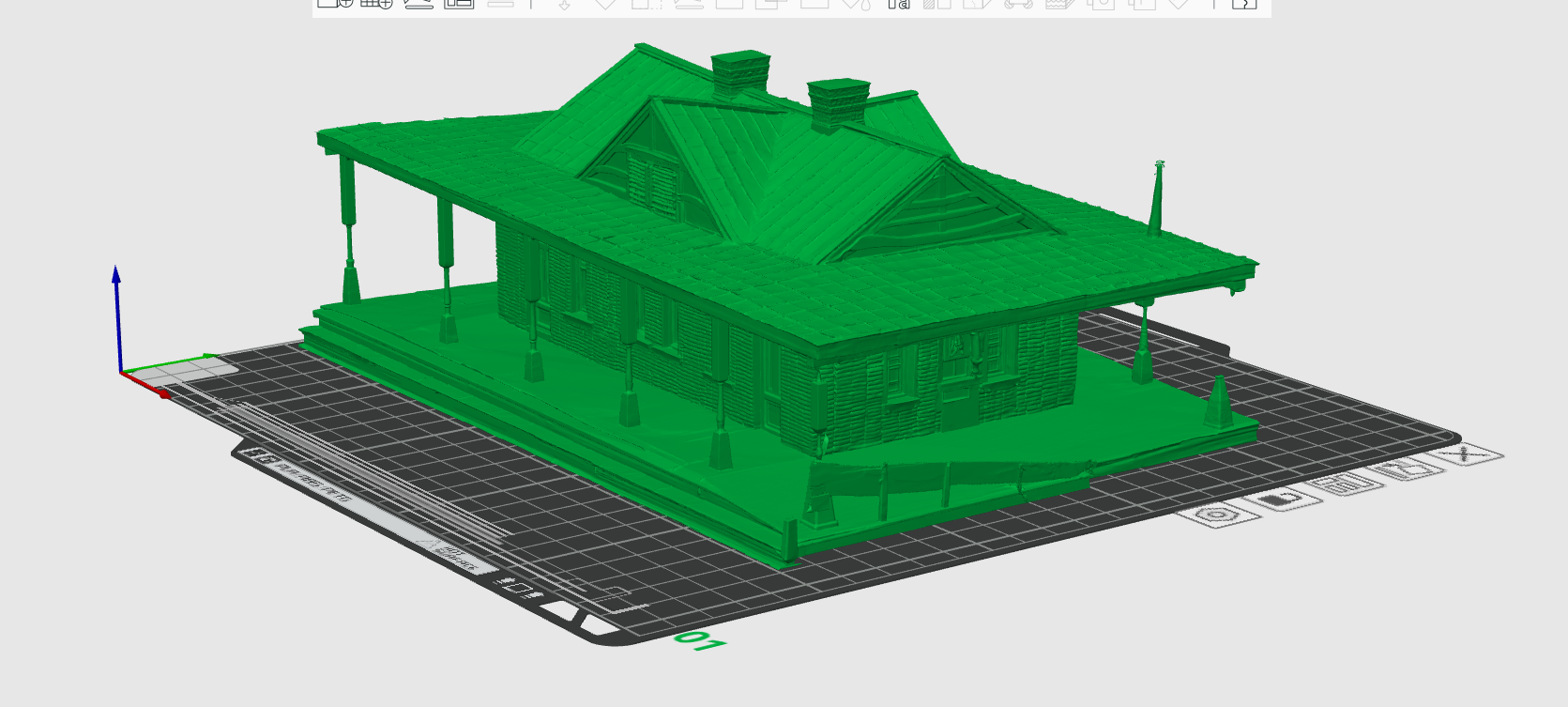
This is the Ridgely train station model. we will slice this into 2 pieces to make the model: the roof and base. will make the base in dark red and roof in black or green.

Summary: **todo summary
30. William Still Interpretive Center
Tragedy and Triumph on the Road to Freedom
William Still Interpretive Center - Harriet Tubman Byway - Denton, Maryland William Still’s mother Sidney and four of her children lived in a house similar to this on Alexander “Saunders” Griffith’s plantation. Her husband, Levin Still, had been set free in 1798 by his young enslaver and resettled in New Jersey, hoping to bring his family there. Around 1806, Sidney escaped with her four children, but was soon recaptured.
After being locked away for three months, she was released and promptly fled again. In a heartbreaking decision, she was forced to leave behind two sons, Peter and Levin. Enraged by her actions, Griffith sold the two boys to slave traders from Kentucky. After joining her husband in New Jersey, Sidney renamed herself Charity, and the Stills raised a large family there. William, born in 1821, was the youngest of 18 siblings.
William Still became educated and moved to Philadelphia where he became Chairman of the Philadelphia Vigilance Committee of the Pennsylvania Anti-Slavery Society, assisting in the escapes of an estimated 1,500 freedom seekers. Harriet Tubman frequently passed through Still’s office, seeking protection and support for her rescues.
In 1850, Still realized that one of the men he was assisting was his own lost brother Peter, who had been sent to Alabama by his Kentucky enslavers years earlier. Peter’s later memoir, The Kidnapped and the Ransomed, raised enough funds to purchase his enslaved family. William Still’s documentation of more than 1,000 freedom seekers was published in 1871 as The Underground Railroad, one of the most important and authentic records of the operations of the Underground Railroad in history.
The Interpretive Center celebrates the Still family’s own daring and heart-wrenching struggle for freedom from bondage through escape, resettlement, and later, Underground Railroad activity. The center, housed in a historic one room “cottage” from 1820, features a period “slave cabin” interior, exhibits and a “garden patch” highlighting foodstuffs common in gardens cultivated by Eastern Shore enslaved people.
The house underwent restoration for years, and opened to the public in May 2022. Onsite signage tells the stories of the site from the time of Algonquin Indians, early commercial agriculture, and the William Still family connection. A glass rear door allows visitors to see inside the restored historic dwelling. The building does not offer any visiting hours, but visitors are welcome sunrise to sunset to view the building and peek through the glass door to see inside.
Summary: **todo summary
03/02/26 short pictures of house at Choptank Electric. converted to 3d model using hitem3d.ai


03/09/26 made 3d model at caroline public library using bambu suite software and bambu xc1 printer.
Use the 3D Quaker Meeting Model.
quaker_house_Hitem3d-1773665447634.stl
Summary: **todo summary